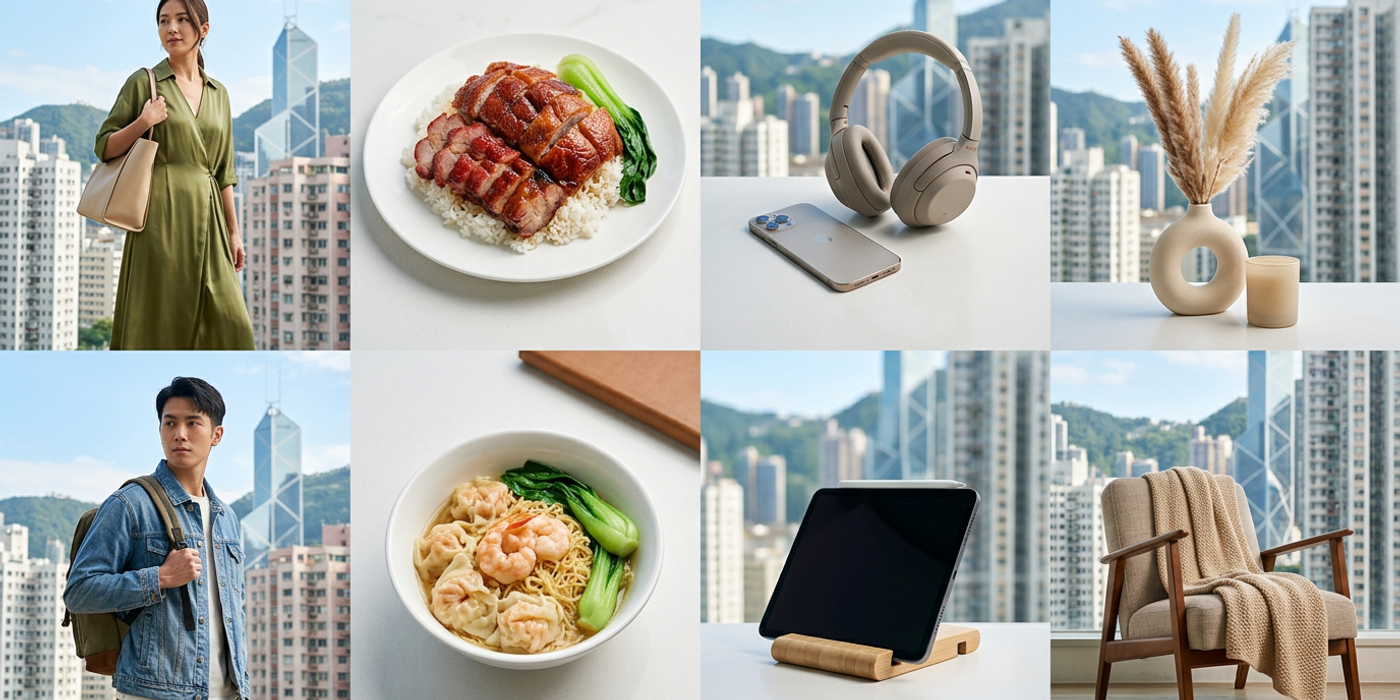
Pick the right AI model for every e-commerce product type. Late-2026 guide to fashion, food, electronics and lifestyle photography for Hong Kong brands.
Ever wondered why some AI-generated product images look flawless while others miss the mark? The secret isn't better prompts — it's choosing the right model for the product category. In late 2026, Hong Kong e-commerce brands have more AI image generation options than ever, and the gap between an average result and a production-ready image often comes down to model selection.
Different AI models excel at different product types. Fashion images need precise fabric rendering and human pose control. Food photography demands realistic textures and appetising colours. Electronics require sharp edges and accurate logos. And home decor needs consistent lighting across a shot sequence. Using the wrong model for the category wastes credits and produces images that still need manual retouching — defeating the whole point of AI generation.
This guide breaks down which models serve which product categories in late 2026, with concrete workflows for each.
Fashion & Apparel: Ideogram 4.5 and Flux 3 Image
Fashion is the hardest category for AI image generation because it combines human figures, fabric textures, and branding elements all in one frame. Two models stand out in late 2026.
Ideogram 4.5 is the top choice for fashion e-commerce. Its in-place editing feature — new in the 4.5 release — lets you generate a model wearing a garment, then replace the garment with a different colour or pattern without regenerating the rest of the image. For Hong Kong brands running multiple colour variants, this cuts production time from hours to minutes. Ideogram 4.5 also handles text rendering on clothing logos better than any other current model, reducing the need for manual Photoshop fixes.
Flux 3 Image with its 4K output and multi-step editing is ideal for hero shots and lookbook images where resolution matters. The editing workflow lets you start with a base pose, refine the garment fit, and add background styling in separate passes — each step preserving the previous result. Flux 3 Image's strong anatomy understanding means fewer hands-and-fingers issues with human models, a persistent pain point in earlier models.
Workflow tip: Start with Ideogram 4.5 for colour and pattern variants. Use Flux 3 Image for the primary hero shot that needs maximum resolution and compositional control. The combination covers both speed and quality requirements.
Food & Beverage: Nano Banana 2.1 and Qwen-Image-2.1
Food photography is about texture, colour, and lighting — areas where the late-2026 model landscape has shifted significantly.
Google Nano Banana 2.1 delivers the most photorealistic food results at the lowest cost per image (50% cheaper than its predecessor). It handles steamed dishes, glossy sauces, and layered ingredients with a natural depth of field that looks shot on a prime lens. For Hong Kong's food delivery and restaurant marketing, Nano Banana 2.1 produces menu-worthy results on the first or second generation, which is unusually efficient for this category.
Qwen-Image-2.1 is the open-weight alternative that excels at ingredient and close-up shots. Because it runs on consumer GPUs, Hong Kong brands can set up in-house generation without per-image API costs — particularly valuable for businesses producing 50+ food images per week for delivery platform menus. Qwen-Image-2.1's strength in East Asian cuisine presentation (dim sum, congee, noodle dishes with their specific plating conventions) gives it an edge over Western-centric models.
Workflow tip: Use Nano Banana 2.1 for restaurant hero shots and promotional banners. Switch to Qwen-Image-2.1 for high-volume menu updates where cost control is the priority.
Electronics & Gadgets: Flux 3 Image and ChatGPT Images 2.5
Electronics e-commerce demands precision: sharp text on product labels, accurate port placements, and consistent reflection handling on glossy surfaces.
Flux 3 Image leads for hero product shots of electronics. Its 4K resolution preserves fine details — USB port outlines, button textures, screen reflections — that lower-resolution models blur into noise. The multi-step editing workflow lets you generate the product, then add context elements without affecting the product rendering.
ChatGPT Images 2.5 introduces sketch templates useful for electronics. Generate a product layout sketch, and the model fills in photorealistic detail while preserving structural accuracy. This is valuable for products that exist as CAD renders — generate a sketch from your spec, then let the model produce the final marketing image with accurate proportions.
Workflow tip: Use Flux 3 Image for primary product images where resolution dictates the buying decision. Use ChatGPT Images 2.5 with sketch templates for products still in prototyping where you need marketing-ready visuals before physical samples exist.
Home & Lifestyle: Ideogram 4.5
Home and lifestyle e-commerce has a different challenge: scene consistency across a product range. A cushion set appearing in three colourways needs the same lighting, camera angle, and environment for each variant.
Ideogram 4.5 is the strongest choice here, again thanks to its in-place editing. Generate one base scene with your hero product, then swap in different colour variants, pattern combinations, or accessory arrangements — each variant inherits the same lighting and composition. For Hong Kong furniture and home decor brands, this means a 12-variant product launch becomes one base generation plus 11 in-place edits rather than 12 separate generations that may not match.
Frequently Asked Questions
Q: Can I use one AI model for all my e-commerce categories? A: It's possible but not optimal. Each model has strengths — Ideogram 4.5 for fashion, Nano Banana 2.1 for food, Flux 3 Image for electronics. Switching models per category produces better results.
Q: How many generations does it take to get a production-ready e-commerce image? A: With the right model, most brands get a usable result in 2-3 generations. Late-2026 models are significantly more reliable on the first pass than earlier versions.
Q: Do I still need Photoshop with these AI models? A: For colour variants and background swaps, AI handles it. For precise logo placement, multi-product compositions, and brand guideline enforcement, keep a designer in the loop.
Q: Which model is cheapest for high-volume e-commerce image production? A: Qwen-Image-2.1 running on your own GPU hardware has the lowest per-image cost at scale. Nano Banana 2.1 is the most affordable API option at roughly half the price of its predecessor.
Q: Are these models good at generating Hong Kong-specific product imagery? A: Yes, with some caveats. Ideogram 4.5 and Nano Banana 2.1 handle modern HK interiors and street scenes well. Qwen-Image-2.1 has specific training on East Asian visual contexts, making it the strongest choice for culturally specific product photography.
Q: How do I maintain consistent brand styling across different AI models? A: Build a shared reference image library — each model can ingest reference images for style transfer. Keep your brand colour hex codes, lighting preferences, and composition rules documented so every team member uses the same inputs.
Q: What resolution do I need for Hong Kong e-commerce platforms? A: Most HK platforms display images at 1080p. Flux 3 Image's 4K output gives you headroom for cropping and zoom variants. For product detail zoom features, start with 4K and export to 1080p.
Q: Can AI models handle Cantonese text in product images? A: Chinese text rendering has improved significantly in 2026 but still lags behind English. For Cantonese or Traditional Chinese text on product labels, add the text in post-production rather than relying on the model.