From in-place edits to multi-step refinement—late 2026 AI image models let you change specific parts, sketch concepts, and iterate faster than ever. Here's how.
In late 2025 and early 2026, editing an AI image meant one thing: regenerate from scratch. Want to change a product's colour? New prompt, new generation. Need to fix a hand or adjust a background element? Start over. That workflow defined AI image creation through mid-2026 — and the late-2026 model wave fundamentally changed it.
Ideogram 4.5, FLUX 3 Image, ChatGPT Images 2.5, and Nano Banana 2.1 now let you edit specific parts of an image, stack refinements in sequence, and iterate from rough sketches — all without starting from zero. For Hong Kong creators producing marketing visuals, social content, and advertising campaigns, these tools cut revision cycles from hours to minutes. This guide breaks down the new editing capabilities and how to build them into your daily workflow.
Three New Editing Paradigms in Late 2026
Late 2026 introduced three distinct editing approaches that replace the old regenerate-and-hope model. Each solves a different problem in the creative pipeline.
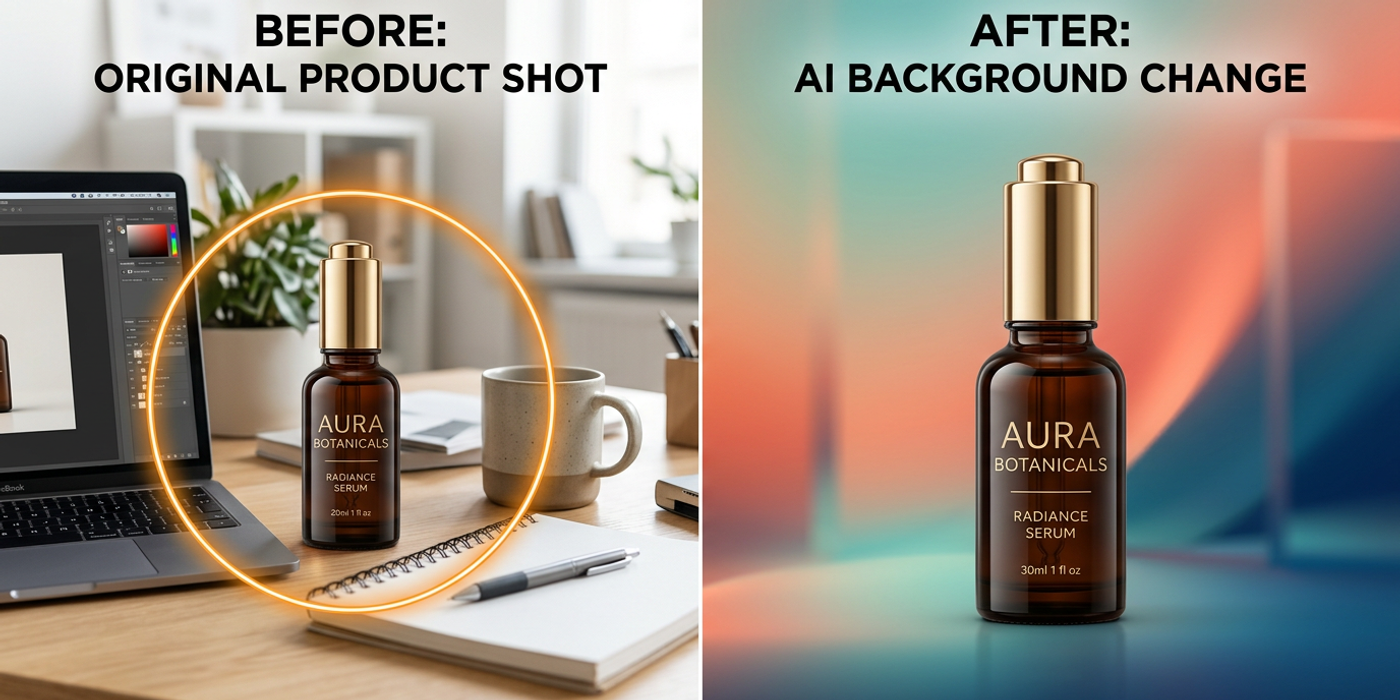
In-place editing is the biggest shift. With Ideogram 4.5, you select a region of an existing image — a product's label colour, a model's outfit, a background element — and describe the change in natural language. The model redraws only that region while preserving everything else. For e-commerce brands producing catalogue images, this cuts revision cycles from hours to minutes. No masking, no Photoshopping around an AI generation, no pixel-level brushwork.
Multi-step refinement treats editing as a sequential process. FLUX 3 Image lets you generate a base image, then layer edits one at a time — adjust lighting in step one, add an object in step two, apply a colour grade in step three — with each step building on the last. The model remembers the full edit history, so you can backtrack or branch at any point. For advertising agencies producing campaign visuals with multiple review rounds, this structured pipeline means one base image serves five variations.
Sketch-to-image starts with a rough concept. ChatGPT Images 2.5 takes a drawn sketch — from a tablet, a traced photo, or even a whiteboard photograph — and refines it into a finished image. The template mode goes further, letting you define compositional layouts and element positions before the model fills in details. For art directors who want to control framing and arrangement before committing to a visual style, this is the most natural workflow yet.
When Each Model Delivers the Most Value
The new editing models excel in different scenarios. Matching the tool to the task is the key to getting fast results.
Ideogram 4.5 shines at surgical edits. A social media manager swapping background colours across five product variations gets each change in under a minute, with the product's lighting and reflections preserved exactly. The model handles the masking internally — you just describe what to change and where.
FLUX 3 Image is built for complex commercial work. Start with a subject, adjust scene lighting in step two, add props in step three, apply a film grade in step four. Each step is reversible, and the full history stays available. For creative directors who need to explore multiple directions from one base image, this multi-step pipeline replaces hours of Photoshop work.
ChatGPT Images 2.5 is most powerful in the concept phase. Draw rough compositions, specify where elements should appear, and let the model generate the finished version. The template mode adds preset layouts — product-on-left with text-on-right — that match common advertising formats. Hong Kong agencies pitching campaign concepts can go from whiteboard sketch to polished visual in a single step.
Building a Cost-Effective Editing Pipeline
The new editing models change the economics of AI image production. Since Nano Banana 2.1 cut generation costs by 50 percent in October 2026, the smartest multi-model workflow is: generate the base image on Nano Banana 2.1 at the lowest cost, then route to Ideogram 4.5 or FLUX 3 Image for targeted edits. For budget-conscious creators, this hybrid approach keeps per-image costs under control while delivering professional results.
For teams running open-weight workflows, Qwen-Image-2.1 handles initial generation on consumer GPUs. Use cloud APIs only for the editing pass. This two-tier approach suits studios producing high volumes where every dollar of compute matters — generate locally, edit in the cloud, and only pay for the refinement step.
Practical Tips for Multi-Model Editing
First, save intermediate versions. Each model handles edits differently — keep both the original and each edited version. FLUX 3 Image's history feature makes this automatic, but for cross-model workflows, manual versioning prevents lost work.
Second, use descriptive edit prompts. In-place editing works best when you specify exactly what to change and how. Instead of "make it better," try "change the background to a grey studio wall with soft shadows" or "replace the red label with a blue one."
Third, know each model's limits. Ideogram 4.5 handles one to three targeted changes per session most reliably. FLUX 3 Image supports longer edit chains. ChatGPT Images 2.5 sketch mode works best for initial composition rather than fine detail work.
Frequently Asked Questions
Q: What is in-place editing in AI image generation? A: In-place editing lets you select a specific region of an existing AI image and describe a change — the model redraws only that area while keeping everything else identical.
Q: How is Ideogram 4.5 different from earlier image editors? A: Earlier tools required full regenerations or external Photoshop work. Ideogram 4.5 preserves untouched areas exactly, including lighting, texture, and pixel-level detail around the edit boundary.
Q: Can I really edit one part of an image without affecting the rest? A: Yes — that is the defining feature of late 2026 editing models. The model masks the changed region and generates new content that matches the existing image style and resolution.
Q: How does FLUX 3 Image multi-step editing work? A: Each edit creates a new layer in the model generation history. You can undo, branch, or continue from any previous step — it is like version control for image creation.
Q: Is ChatGPT Images 2.5 sketch mode better than prompting from text? A: It is different — better for composition control. A sketch gives the model exact positional information that text descriptions struggle to convey. Use it when layout matters more than texture.
Q: What is the cheapest way to use these new editing models? A: Generate the base image on Nano Banana 2.1 at 50 percent lower cost, then apply edits on Ideogram 4.5 or FLUX 3 Image. For high volumes, Qwen-Image-2.1 runs on your own GPU for generation.
Q: How many edits can I apply to one image? A: FLUX 3 Image supports unlimited sequential edits with a full history. Ideogram 4.5 works best for one to three targeted changes per session. For extensive edits, regenerate from a stable base first.
Q: Does in-place editing work for product photography? A: Yes — it is one of the strongest use cases. Change product colours, swap backgrounds, adjust lighting — all without restaging or re-photographing the product.