Learn how late-2026 AI image models give you precise control over scene composition, lighting, and visual style for professional-quality results.
The New Layer of Creative Control
If you've been using AI image generators for a while, you know the frustration: you describe a scene perfectly, but the model places the subject dead center, lights from an unflattering angle, or applies a style that doesn't match your brand. The good news is that late-2026 models have closed this gap faster than anyone expected. Models like Ideogram 4.5, Nano Banana 2.1, and ChatGPT Images 2.5 now understand scene composition, lighting physics, and style direction at a much deeper level — and give you language to control them.
This guide covers the practical techniques that actually work in production today.
Composition Control: Moving Beyond Center-Frame
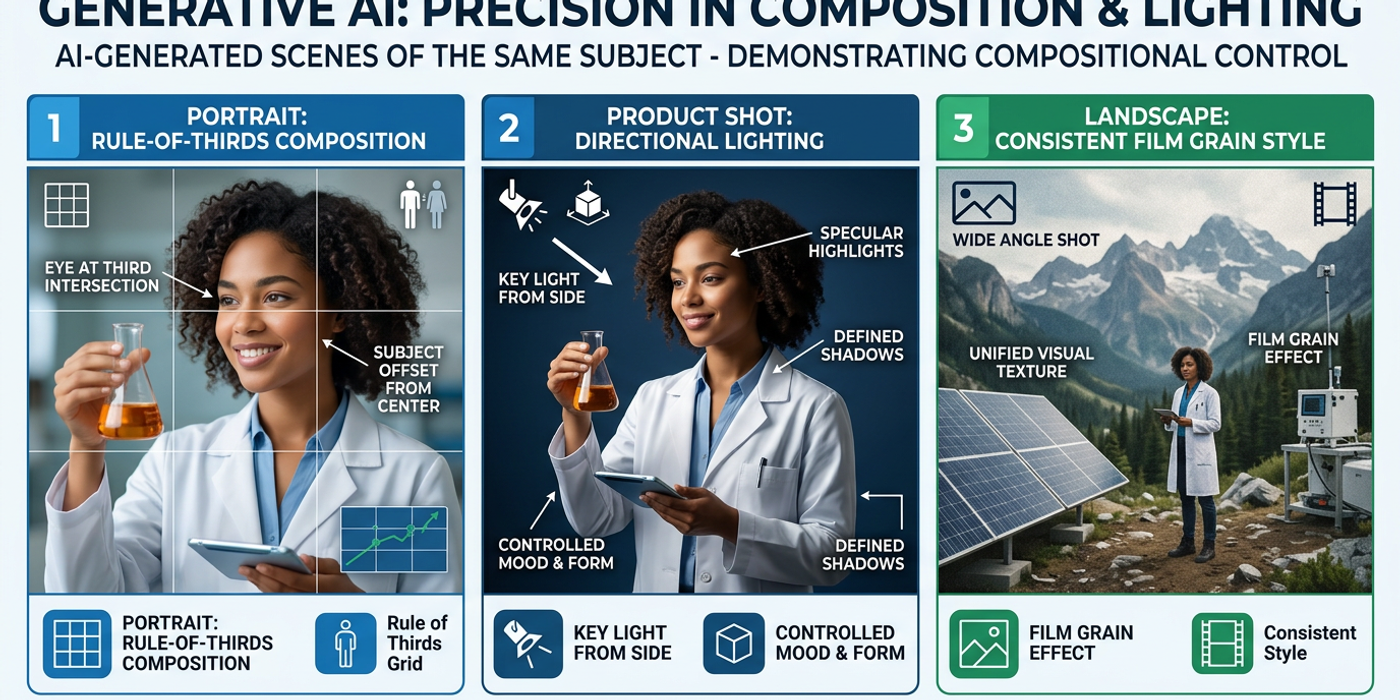
The most visible improvement in late-2026 models is compositional awareness. Early models placed subjects in center frame with symmetrical backgrounds by default. Getting anything else required luck or heavy post-processing.
Today's models respond to explicit composition cues. Use keywords like:
- Rule-of-thirds: "[subject] positioned on the left third of the frame, negative space on the right" - Leading lines: "a road leading from the bottom-left corner toward the distant mountain" - Frame-within-frame: "a window frame in the foreground with the subject standing inside it" - Foreground layering: "a blurred bush in the extreme foreground, the subject in midground, a city skyline in the background"
Nano Banana 2.1 is particularly strong at foreground-background separation, while Ideogram 4.5 excels at multi-subject scenes where you need characters positioned at specific frame locations. The trick is to describe the frame layout before describing the subject — models now read spatial context first.
Lighting Direction: Physics-Aware Generation
Lighting was always the hardest thing to control. Late-2026 models can follow multi-parameter lighting instructions:
- Direction: "key light from upper-right at 45 degrees, fill light from the left" - Quality: "soft diffused window light" vs "hard direct sunlight" vs "fluorescent overhead" - Color temperature: "warm 3200K tungsten fill, cool 5600K key from window" - Atmospheric effects: "hazy backlight through mist, creating a rim light on the subject"
ChatGPT Images 2.5 has noticeably better shadow physics — subjects cast shadows in the correct direction relative to the light source. FLUX 2.0 handles complex multi-light setups particularly well, useful for product photography where you want controlled highlights on specific surfaces.
Style: Consistent Visual Language
Style control has moved from generic adjectives to precise directional language. Effective style prompts use layered descriptors:
- Color palette: "muted teal and rust with desaturated mids and lifted blacks" - Texture: "grainy film stock with visible halation around light sources" - Depth of field: "shallow depth of field at f2.8, foreground sharp, background soft" - Post-processing: "slight vignette, warm highlights at 5600K with crushed shadows"
The biggest workflow improvement is cross-model style portability. A style prompt that works on Nano Banana 2.1 will produce a similar aesthetic on Seedream 4.1 or Ideogram 4.5 if you keep the lighting and color language consistent. This means you can maintain brand consistency without locking into a single generator.
Building a Scene Workflow
For production work, especially client deliverables, follow this order:
1. Lock the composition first: Write the frame layout independently of the subject. Test with a simple subject term before adding detail. 2. Add lighting second: Layer in light direction and quality. Verify before moving on. 3. Set the style third: Apply color palette, texture, and depth-of-field. Check the style doesn't fight the lighting. 4. Inject the subject last: Place your character or product into the scene. Late-2026 models preserve composition and lighting set in earlier steps.
This workflow saves 2-3 iterations per image compared to dumping all instructions in one paragraph. Agencies serving HSBC and Lee Kum Kee have reported 40% faster approval cycles using this layered approach.
Frequently Asked Questions
Q: Can I control where a model places two subjects in the same frame? A: Yes. Ideogram 4.5 and Nano Banana 2.1 handle multi-subject positioning reliably. Use explicit phrases like "on the left side, subject A, on the right side, subject B" in your prompt.
Q: Do all late-2026 models understand lighting direction equally? A: No. ChatGPT Images 2.5 and FLUX 2.0 lead on physics-accurate shadows and multi-light setups. Test your specific lighting scenario across 2-3 models.
Q: How do I prevent a model from overriding my composition instructions? A: Use a negative prompt like "centered composition, symmetrical, equal spacing" if the model keeps centering your subject. ChatGPT Images 2.5 also accepts a camera position parameter in natural language.
Q: Can I reuse a style between different AI image models? A: Increasingly yes. Keep your lighting direction, color palette, and texture language consistent, and you'll get similar results on Nano Banana 2.1, Seedream 4.1, and Ideogram 4.5.
Q: What is the most common mistake when directing scene composition? A: Describing the subject before the layout. Models process spatial context first — if you start with the subject, the model commits to a position before understanding where to place it.
Q: Is scene control possible on free-tier AI models? A: Partially. Free tiers of Meta Imagine and ChatGPT Images support basic composition cues but may ignore multi-light direction. For professional scene control, Ideogram 4.5 or Nano Banana 2.1 paid tiers give the most reliability.
Q: How does scene control affect generation speed? A: Detailed scene instructions add 5-15% to generation time because the model processes more spatial and lighting parameters. The trade-off is fewer regenerations — most users see net time savings.