Late 2026 AI image models cut iteration time with in-place editing, real-time previews, and smarter prompt understanding. Build faster creative workflows today.
The biggest bottleneck in AI image generation isn't model quality — it's iteration time. Every revision means regenerating from scratch, tweaking prompts blindly, and hoping the next output gets closer to your vision. In late 2026, that's finally changing.
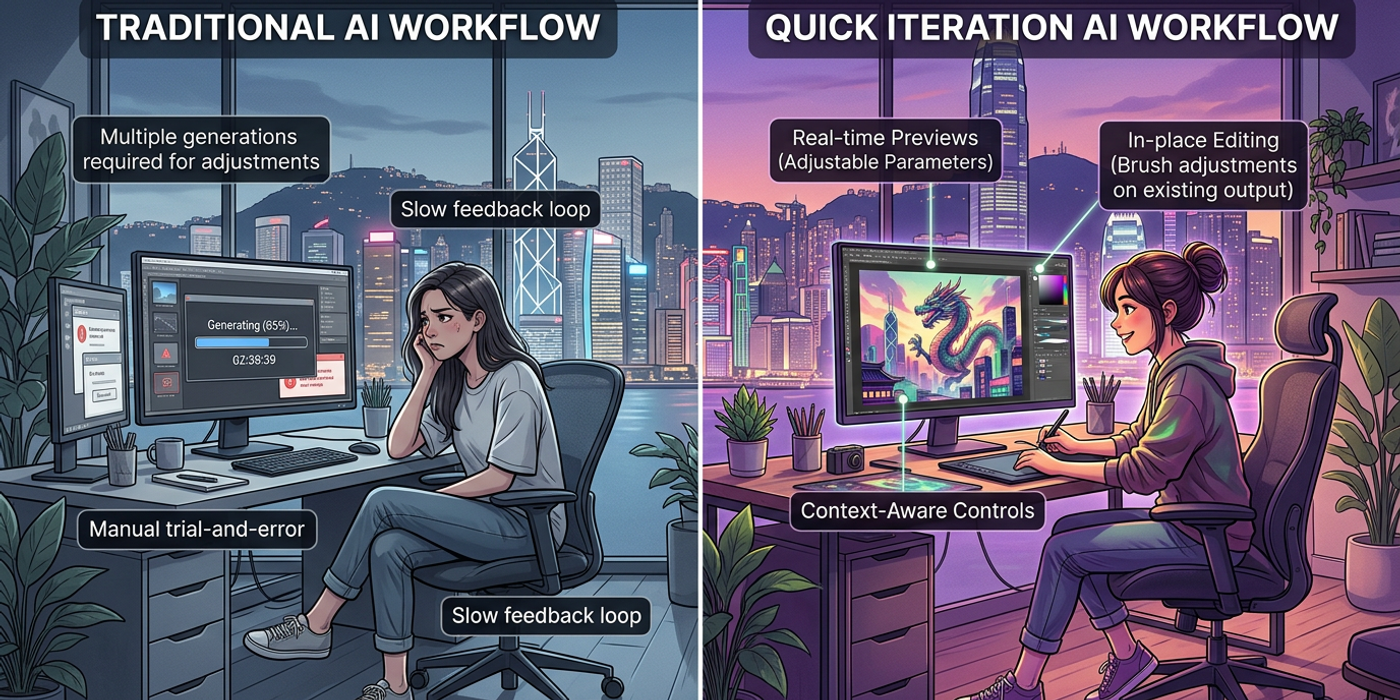
A new generation of AI image models has shifted the paradigm. Instead of forcing you to regenerate entire images for every change, these models let you edit in-place, preview in real time, and communicate intent more precisely. The result is a dramatic reduction in the number of cycles needed to go from concept to final output.
Here are the five model-level features that are rewriting the rules of AI image workflow speed.
In-Place Editing: Change One Thing, Keep Everything Else
The single biggest workflow improvement in late 2026 is in-place editing — the ability to select a specific part of an image and regenerate only that area while keeping everything else intact. Ideogram 4.5 and xAI Imagine Image 2.0 both ship this as a first-class feature.
For Hong Kong creators producing advertising visuals, this is transformative. A product photography mockup might need the bottle colour changed, the background replaced, or the lighting shifted. Previously, each change required a full regeneration — 30 seconds to 2 minutes per attempt, with no guarantee the rest would stay consistent.
With in-place editing, you select a region, describe the change, and the model updates only that area. The lighting, composition, and other elements remain untouched. For a typical advertising workflow with 5-8 revision rounds, this cuts the total generation time by roughly 60%.
The trick is writing effective region prompts. Be specific about what you want to change. Instead of "make it look better," try "change the bottle label from green to gold with a matte finish, keep shadows and reflections as they are."
Real-Time Generation: See Results as You Type
Real-time generation is the second breakthrough changing AI image workflows. Models like FLUX Schnell 2 and Google Nano Banana 2.1 now generate preview-quality images in under two seconds, with full-quality output arriving shortly after.
This changes the fundamental dynamic of prompt iteration. Instead of writing a prompt, waiting 30 seconds, seeing the result, and going back to edit — which creates a slow 60-second feedback loop — real-time models let you see the image forming as you type or adjust parameters. You can interrupt, refine, and redirect before the model commits to a full generation.
For brainstorming and concept development, this is a game-changer. A visual exploration that previously took 45 minutes of serial prompt-and-wait cycles can now be compressed into 10-15 minutes of real-time interaction. Use real-time models for exploration, then switch to a quality model for the final render.
Multi-Step Editing Without Leaving the Canvas
Flux 3 Image introduced a workflow model that other platforms are now adopting: multi-step editing within a single generation session. Instead of generating, downloading, and uploading for the next edit, you can chain operations — upscale, change a specific element, adjust colour balance, and extend the canvas — all within the same session.
This eliminates context-switching overhead. For every step you keep inside the same session, you save 30-60 seconds of download-upload recontextualisation. A five-step polish pass that previously consumed 5-7 minutes of overhead now costs zero.
Hong Kong e-commerce teams producing product shots at scale benefit directly. A workflow — generate product image, upscale for print, adjust background, add elements — can run as a single continuous session.
Templates and Starting Points Cut the First Draft by 80%
ChatGPT Images 2.5 introduced template-based generation — starting from a structured layout or sketch rather than a blank canvas. This reduces first-draft revision cycles because you're already closer to the final layout before the model generates anything.
The templates aren't rigid. Describe a layout structure — "left-aligned product, right-side text block, bottom gradient overlay" — and the model builds the image within that structure. This is useful for Hong Kong social media teams producing carousel ads and feed posts where the layout must follow brand guidelines.
Starting from a template cuts the average revisions from first generation to approval from 6-8 down to 2-3. The savings compound across volume: a team producing 20 social media variants per week saves roughly 80-100 generation cycles.
Smarter Prompt Comprehension Reduces Revision Rounds
Prompt understanding has improved significantly across late 2026 models. ChatGPT Images 2.5, xAI Imagine Image 2.0, and Nano Banana 2.1 demonstrate markedly better adherence to detailed instructions, reducing the need for corrective regeneration.
Three specific improvements matter most:
Compositional accuracy: Objects appear where you ask them to be, eliminating "the subject was on the wrong side" regenerations.
Count accuracy: Specifying "three apples and two oranges" produces correct quantities, removing a common source of revision cycles.
Style adherence: Reference styles are interpreted more faithfully, reducing the need to re-prompt for visual tone.
For Hong Kong advertising agencies producing client decks, these improvements cut 2-3 revision rounds from the average workflow. On a tight pitch deadline, that is the difference between working through dinner and delivering on time.
Putting It Together: A Faster Workflow
Combine these capabilities. Use real-time generation for initial exploration — find the right composition in 10-15 minutes. Switch to template-based generation for the first draft. Use in-place editing for client revision rounds. Apply multi-step editing for final polish.
Each individual improvement saves a few minutes per round. Together, they cut a typical AI image production workflow from 2-3 hours to under an hour without sacrificing quality.
Frequently Asked Questions
Q: Which late 2026 models support in-place editing? A: Ideogram 4.5 and xAI Imagine Image 2.0 offer native in-place editing. Flux 3 Image supports multi-step editing within the same session.
Q: How fast is real-time generation compared to standard? A: Real-time models like FLUX Schnell 2 and Nano Banana 2.1 deliver previews in under two seconds, with full-quality output in 10-20 seconds. Standard generation takes 20-60 seconds.
Q: Can I use templates with any AI image model? A: ChatGPT Images 2.5 has the most developed template system. Other models offer sketch-to-image or reference image features that serve a similar purpose.
Q: How many revision rounds can in-place editing save? A: For workflows with 5-8 typical revision rounds, in-place editing reduces total generation time by roughly 60%. Teams report saving 3-5 rounds per project.
Q: Are real-time models as good quality as standard models? A: Real-time models produce preview-quality output. Use them for exploration, then generate the final version with a premium quality model.
Q: What's the best workflow for combining these techniques? A: Use real-time for exploration, templates for the first draft, in-place editing for revisions, and multi-step editing for polish. This layered approach minimises regeneration overhead.
Q: How do these improvements benefit Hong Kong creators? A: Hong Kong agencies face tight deadlines for advertising campaigns, social media content, and e-commerce photography. Cutting iteration time by 50-60% translates to faster delivery and lower costs.
Q: Will these features work on existing hardware? A: Yes. In-place editing and template-based generation run on standard cloud APIs. Real-time generation needs cloud endpoints, but no local hardware upgrade is needed.