Curious how AI image generators turn text into pictures? Here's a simple breakdown of how diffusion models, latent space, and prompts work together.
AI Image Generation Demystified: From Text to Picture
You type "a golden retriever wearing a detective hat in a rainy alley" and seconds later, an image appears. It looks like a photograph, but no camera was involved.
How does the AI actually do that?
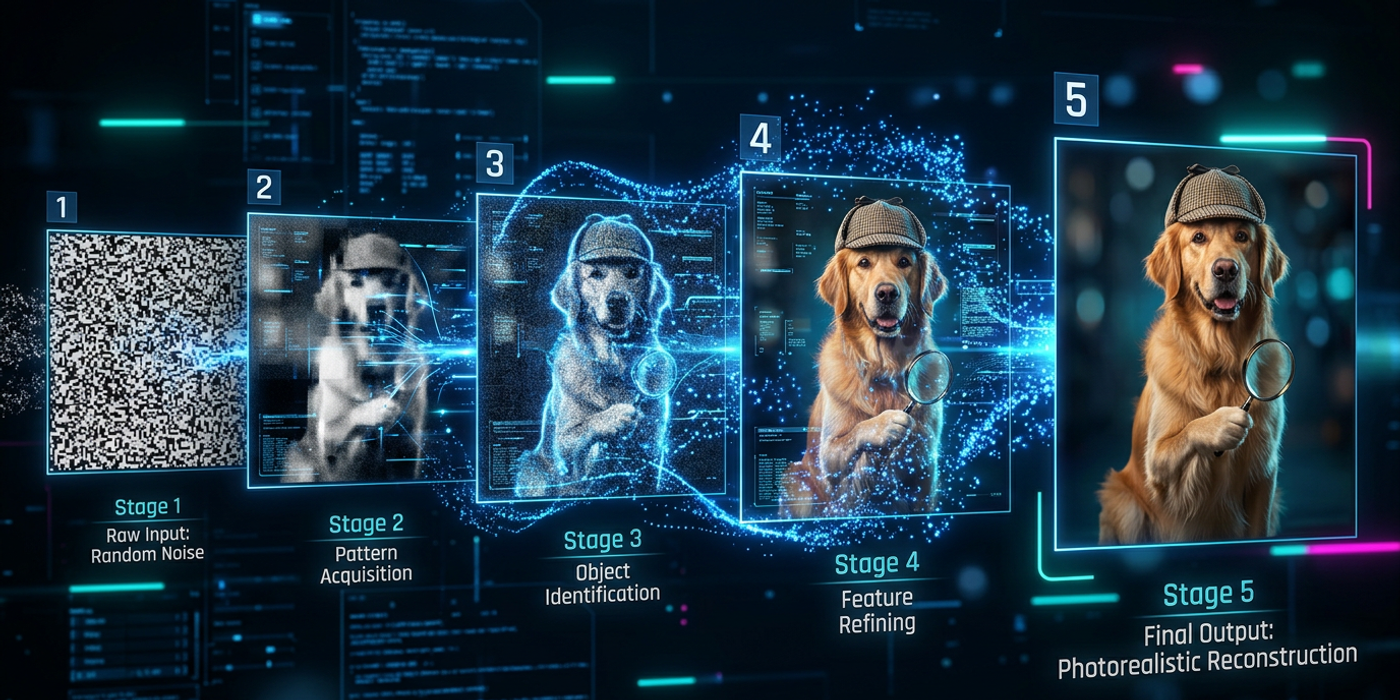
The short answer: AI image generators work by starting with pure noise — random pixels — and gradually removing it step by step, guided by your text description, until a clear image emerges. Think of it like a sculptor chipping away marble to reveal a statue hidden inside.
This article explains what's really happening when you press "generate" in Cooly Studio.
What Is a Diffusion Model?
Most modern AI image generators — including Seedream 4, Stable Diffusion, Flux Schnell, and DALL-E — are built on a diffusion model.
The name comes from a physics concept: diffusion is the process where particles spread out over time, like ink drops dispersing in water. Diffusion models reverse this process.
Training phase: The AI looks at millions of images and learns what they look like at various levels of "noisiness." It learns how to take a clean image, add noise step by step until it's unrecognizable — then learns to reverse that process.
Generation phase: The AI starts with pure random noise (like TV static) and slowly removes it, step by step, following a pattern that matches your text prompt. After enough steps, the noise resolves into a coherent image.
What Is Latent Space?
You've probably heard the term "latent space" — it's a compressed representation of images. Think of it like a zip file for pictures:
- The original image might be 1024×1024 pixels — that's over 3 million individual values - The AI compresses this into a smaller mathematical representation — the "latent" version - All generation happens in this compressed space, which is much faster - When generation is complete, the AI decompresses back into a full-resolution image
This is what happens behind the scenes in Cooly Studio when you generate an image.
How Text Prompts Control the Output
Your prompt doesn't work like a search query. The AI uses a text encoder — a separate model trained to understand language — to convert your words into numerical vectors.
These vectors act like a compass for the generation process:
- "Golden retriever" points toward shapes and textures of dog fur - "Detective hat" points toward hat shapes and fabric patterns - "Rainy alley" points toward wet surfaces and dark ambient lighting
The model combines these directional signals to guide the denoising process. This is why prompt engineering matters — specific prompts give clearer signals, while vague prompts produce muddled results.
The Role of Noise and Randomness
If you generate the same prompt twice, you'll get different images. The starting point — the initial random noise — is different each time.
The seed parameter controls this:
- Fixed seed: Same noise pattern. Output becomes reproducible (useful for iterations) - Random seed: Different noise each time. More variety in outputs
AI image generation is inherently creative because it builds on randomness. The model doesn't copy existing images — it constructs new ones from learned patterns.
Step-by-Step: What Happens When You Click Generate
Step 1 — Text encoding: Your prompt is converted into a mathematical representation.
Step 2 — Random noise generation: A blank canvas of random pixels is created at your chosen resolution.
Step 3 — Iterative denoising: The model looks at the random noise, guided by your text prompt, and predicts the "slightly less noisy" version. It repeats this 20-100 times, each step revealing more structure.
Step 4 — Latent decoding: The final representation is decoded into a viewable image.
Step 5 — Post-processing: Some models apply upscaling, face restoration, or other enhancements.
All of this happens in seconds. When you use Seedream 4 in Cooly Studio, the entire pipeline runs on cloud GPUs — the heavy lifting happens remotely, and only the final image reaches your screen.
Why Different Models Give Different Results
Not all AI image generators are the same. Differences in training data, model architecture, and optimization produce distinct styles:
| Model | Strength | Best For | |-------|----------|----------| | Seedream 4 | Photorealism, lighting, composition | Product shots, portraits, cinematic images | | Flux Schnell | Speed (fewer denoising steps) | Rapid prototyping, bulk generation | | Nano Banana 2 | Bilingual prompt understanding | Hong Kong creators mixing English and Chinese | | DALL-E 3 | Following complex prompts | Detailed scene descriptions |
The "best" model depends on your use case. Cooly Studio gives you access to multiple models so you can pick the right tool for each project.
What the AI Doesn't Understand
Despite impressive results, AI image generators have blind spots:
- Physics is a suggestion: Shadows and reflections don't always follow real-world rules - Anatomy can fail: Fingers and hands are notoriously tricky - Text in images: Writing specific words in generated images is unreliable - Counting: Ask for "three apples" and you might get four, five, or two
These limitations are why iterative refinement — generating multiple versions and selecting the best — is standard practice.
Frequently Asked Questions
Q: Do AI image generators copy existing artwork? A: No. AI models learn patterns from millions of images but don't store or reproduce specific ones. Most commercial tools include safeguards against replicating living artists' styles.
Q: How many images does an AI need to see during training? A: Billions. Models like Seedream 4 and DALL-E 3 are trained on datasets containing 5-10 billion image-text pairs, which is why they understand such a wide range of concepts.
Q: Why does generating an image take seconds instead of minutes? A: Two reasons: generation happens in compressed latent space, and modern GPUs are highly optimized for the parallel math that diffusion models require.
Q: Can I use AI-generated images for commercial purposes? A: It depends on the model's license. Most commercial platforms, including Cooly Studio, grant full usage rights. Always check the terms for your specific model.
Q: What does "steps" mean in AI image generation? A: The number of denoising iterations. More steps (40-50) generally produce cleaner images. Fewer steps (10-20) are faster but may look rougher.
Q: How does a negative prompt work? A: It tells the model what to avoid. For example, adding "blurry, low quality, cartoon" pushes the model away from those features. It works by subtracting the negative prompt's vector from the positive prompt's vector.
Q: Are AI image generators getting better at anatomy? A: Yes. Each major version improves. Seedream 4 and Ideogram 4.0 handle hands and faces significantly better than their predecessors.
Q: Can I run AI image generation on my own computer? A: Some models (Stable Diffusion, Flux Schnell) can run locally with a GPU that has 8GB+ VRAM. But cloud tools like Cooly Studio are more convenient — no hardware requirements and access to the latest models.