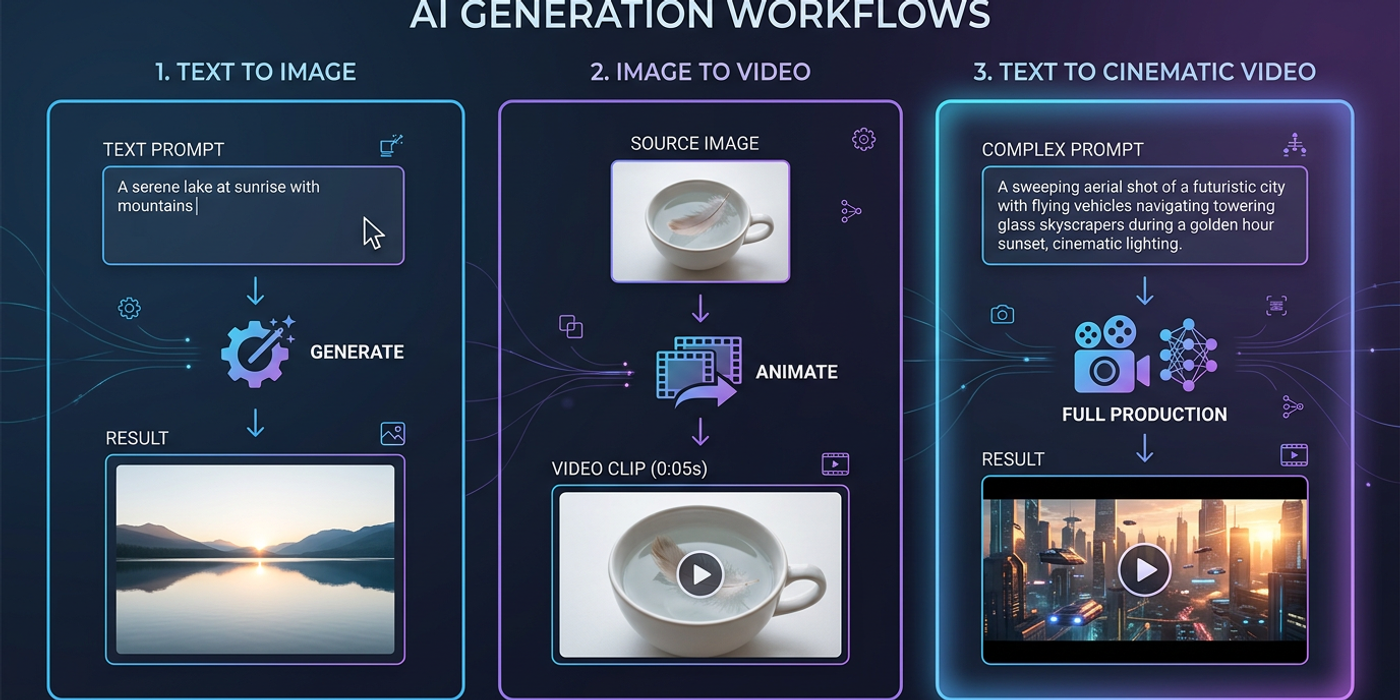
Text-to-image, image-to-video, or text-to-video? Compare the three AI generation workflows in 2026 and learn which approach suits your creative project best.
The AI generation landscape has evolved fast in 2026. Just a year ago, the lines were clear: text-to-image made pictures, image-to-video animated them, and text-to-video was experimental. Today, hybrid models like Seedance 2.5, Veo 3.1, Kling 3.0, and Meta Muse blur all those boundaries.
But here's the thing — knowing which workflow to use still matters. Each approach has different strengths, different costs, and different turnaround times. Pick the wrong one and you're burning credits on outputs that don't fit your brief.
Let's break down the three core workflows, when to use each, and how they stack up in 2026.
What Is Text-to-Image Generation?
Text-to-image (T2I) is the original AI image generation workflow. You write a prompt, the model generates a still image. Seedream 4, Flux Schnell, DALL-E 4, and Meta Muse Image all operate primarily in this mode — though some now offer image-to-image and inpainting as secondary features.
When to use text-to-image: - You need a standalone image for social media, ads, or presentations - You want full creative control over composition, lighting, and style - Speed matters — T2I generates in 2–10 seconds, making it the fastest workflow - Budget is tight — T2I costs the least per output
2026 update: The big shift this year is that T2I models now produce native 2K–4K resolution. Ideogram 4.0 went open-weight with native 2K, and Muse Image outputs at Instagram-native resolutions. Resolution is no longer a differentiator between workflows.
What Is Image-to-Video Generation?
Image-to-video (I2V) takes a still image as input and animates it into a short video clip. You provide the image (generated by AI or shot yourself), and the model adds motion, camera movement, and scene dynamics. Kling 3.0, Veo 3.1, and Pika 3.0 all excel at this.
When to use image-to-video: - You want precise control over the starting frame of your video - You have an existing brand asset (product photo, illustration) that needs motion - You need consistent character appearances across multiple shots - Your project requires specific composition that you can nail in a still image first
2026 update: The latest I2V models now support multi-shot consistency. Seedance 2.5 generates 30-second single-shot clips with scene changes — a massive leap from the 4–5 second clips of 2025. This makes I2V viable for narrative storytelling, not just abstract loops.
What Is Text-to-Video Generation?
Text-to-video (T2V) generates video directly from a text prompt, skipping the image step entirely. It's the most convenient workflow but historically the least controllable. Models like Veo 3.1, Kling 3.0, and Sora all have T2V modes, though quality still varies.
When to use text-to-video: - Speed is more important than precise composition - You're generating mood/concept videos, not brand-critical assets - You want to quickly explore multiple video directions - The scene is simple enough that a prompt can describe it fully
2026 update: T2V controllability has improved dramatically. Veo 3.1 now supports camera directives (pan, tilt, dolly, zoom) directly in prompts. Kling 3.0 handles complex scenes with multiple subjects. But for brand work where specific layout matters, I2V still wins.
How to Choose: A Decision Framework
Here's a quick workflow to decide:
1. Need a still image? → Text-to-image. Always. 2 seconds, minimal cost. 2. Need a video with specific composition? → Generate an image first, then use image-to-video. You control the starting frame. 3. Need a video fast and composition isn't critical? → Text-to-video. Get 80% of the way there in one click. 4. Need a long video clip (15+ seconds)? → Image-to-video. Seedance 2.5 and Kling 3.0 handle longer durations better than T2V. 5. Need consistent characters across scenes? → Generate a character reference sheet as an image, then use I2V for each scene. This is the most reliable workflow for narrative consistency.
Cost Comparison in 2026
Costs have come down significantly, but the hierarchy remains:
- Cheapest: Text-to-image — $0.001–$0.005 per image depending on resolution - Mid-range: Image-to-video — $0.01–$0.05 per 5-second clip (plus image generation cost) - Most expensive: Text-to-video — $0.03–$0.10 per 5–10 second clip
For a Hong Kong agency producing a 30-second social media ad, the cost difference adds up. A full T2V workflow might cost $0.30–$0.60, while a T2I → I2V pipeline could be $0.10–$0.30 with better compositional control.
The Hybrid Workflow: Chaining Everything Together
The most powerful approach in 2026 isn't choosing one workflow — it's chaining them. Here's what a typical agency production pipeline looks like:
1. Text-to-image to generate keyframes and style frames 2. Image-to-video to animate each keyframe into a clip 3. Video-to-video (emerging) to apply consistent styles across clips 4. AI voiceover (ElevenLabs, PlayHT) to add narration 5. AI music to add background score
Cooly Studio makes this chaining seamless — you can generate, animate, and edit in one workspace without switching between tools.
Frequently Asked Questions
Q: Can I use text-to-image to generate frames for a video storyboard? A: Yes. This is one of the most common workflows. Generate keyframes with T2I, then chain them through I2V to animate each scene.
Q: Which workflow produces the highest quality video? A: Image-to-video consistently produces higher quality than text-to-video because you control the starting frame. The best results come from generating a high-quality T2I image first, then animating it.
Q: Is text-to-video good enough for social media ads in 2026? A: For simple ads (product showcase, text overlay, background motion), yes. For complex ads with brand-specific layouts, image-to-video gives you more control.
Q: How long does each workflow take? A: Text-to-image: 2–10 seconds. Image-to-video: 15–60 seconds. Text-to-video: 30–120 seconds depending on duration and resolution.
Q: What's the best workflow for character consistency? A: Generate a consistent character image with T2I using seedlocking and reference images, then use I2V for each scene. This is the most reliable approach in 2026.
Q: How do costs compare for a full 30-second video? A: Text-to-video: $0.30–$0.60. Image-to-video (T2I + I2V pipeline): $0.10–$0.30. Text-to-image only (for storyboards): $0.02–$0.05.
Q: Can I use the same prompt for text-to-image and text-to-video? A: Not directly. Video prompts need motion descriptions, camera movements, and duration cues. Image prompts focus on composition, lighting, and style. Different prompts for different outputs.
Q: Does image-to-video work with any image, or only AI-generated ones? A: It works with any image — photos, illustrations, renders. But AI-generated images tend to work better because they naturally align with the model's latent space.
Q: Which workflow is best for lip-sync talking head videos? A: Image-to-video with a lip-sync model (like Kling 3.0's lip-sync feature or dedicated tools). Generate a consistent character image, then animate with audio-driven lip movement.
Q: What resolution do AI videos output in 2026? A: Most models output 1080p natively. Seedance 2.5 and Veo 3.1 support up to 4K. Text-to-image still leads in maximum resolution at 2K–4K native.