xAI launches Imagine Image 2.0 with editing tools and templates. Here's how it stacks up against GPT-Image-2 and what it means for HK creators.
xAI has launched Imagine Image 2.0, a major update to its image generation model now available in "Quality Mode" on grok.com and in Grok's iOS and Android apps. The model brings editing tools, pre-built templates, and consistent character generation — features that make it more than a simple text-to-image generator.
In Arena leaderboards, Imagine Image 2.0 ranks second globally in both image editing and text-to-image, trailing only OpenAI's GPT-Image-2. Its "low" variant scores an Elo of 1,439 in the Image Edit Arena (vs GPT-Image-2's 1,463) and 1,320 in Text-to-Image (vs 1,380). That puts it ahead of Reve 2.1, Meta's Muse-Image, Alibaba's Qwen-Image-3.0-Pro, and ByteDance's SeedDream.
Editing Tools Built for Iterative Workflows
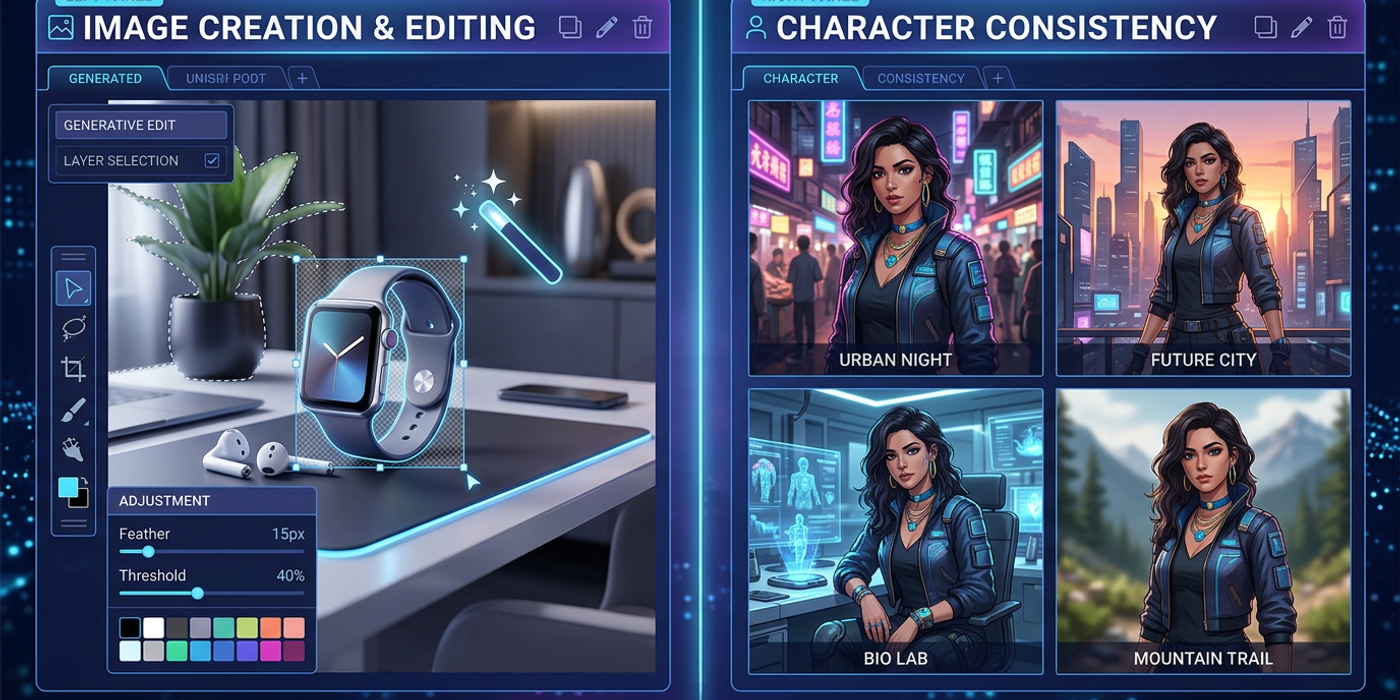
What sets Imagine 2.0 apart is its editing suite — tools that let creators refine images without starting over:
- Magic Wand modifies only the selected area of an image - Segmentation lets users pick precise regions for targeted edits - Background removal exports subjects with transparent backgrounds - Multi-Ref Editing combines up to five input images into one generation - Smart Resize converts images to any aspect ratio, with the model filling in extra space automatically
For Hong Kong creators producing product shots, social media assets, or ad creative, these tools cut iteration time. Instead of regenerating a full image to fix one element, you can edit selectively — similar to how Photoshop layers work, but AI-generated.
Templates for Real-World Production
xAI bundled common image workflows into templates across product photography, marketing materials, design tools, game assets, and streaming graphics. This makes the model more approachable for creators who don't want to craft complex prompts from scratch.
The standout feature is consistent character and world generation — Imagine 2.0 generates characters, locations, and props separately while keeping the visual style consistent. xAI positions this as a stepping stone toward video production. For HK agencies producing brand content series at scale, this could be a game-changer.
API Access Coming Soon
Currently, Imagine 2.0 is available through grok.com and Grok's mobile apps. API access is coming soon, per xAI. Once the API launches, it could be integrated into tools like Cooly Studio, giving HK creators a new option alongside Flux, Seedream, and Stable Diffusion.
How It Compares to Other Models
Imagine 2.0's editing-first approach differentiates it. Where many models treat generation and editing as separate workflows, Imagine 2.0 builds editing into the core. Smart Resize alone is rare in AI image generation and solves a practical pain point for social media managers who need multiple aspect ratios.
The consistent world generation opens up new possibilities for pre-production — characters, environments, and props that belong in the same project without manual style matching.
Frequently Asked Questions
Q: Is xAI Imagine Image 2.0 free to use? A: It's available through grok.com and Grok apps. Free-tier users get limited generations; X Premium+ subscribers get higher limits. API pricing hasn't been announced.
Q: How does Imagine 2.0 compare to GPT-Image-2? A: GPT-Image-2 still leads by about 2% in image editing and 4% in text-to-image. But Imagine 2.0 beats every other model, including Meta's Muse-Image and Alibaba's Qwen-Image-3.0-Pro.
Q: Can I use Imagine 2.0 with Cooly Studio? A: Not yet — API access is rolling out. Once available, Cooly Studio can add it alongside existing models, letting you compare outputs and pick the best model for each project.
Q: What kind of images does Imagine 2.0 handle best? A: Product photography, marketing visuals, and brand assets where consistent style matters. The editing tools and templates make it strong for iterative commercial work.
Q: Does it support Chinese text in images? A: The model keeps typography clean, but xAI hasn't addressed multilingual text support. For Chinese text in AI-generated images, post-production approaches are still needed.
Try Imagine 2.0 on grok.com. When API access arrives, Cooly Studio will be your hub for testing it alongside every other major model.